
The Prompt Is Still the Work: Dynamic Workflows in Claude Code
Six Patterns, a Live Compliance Audit, and Why Specification Discipline (Evals) Matters More at Scale

1. Static vs Dynamic Harnesses?
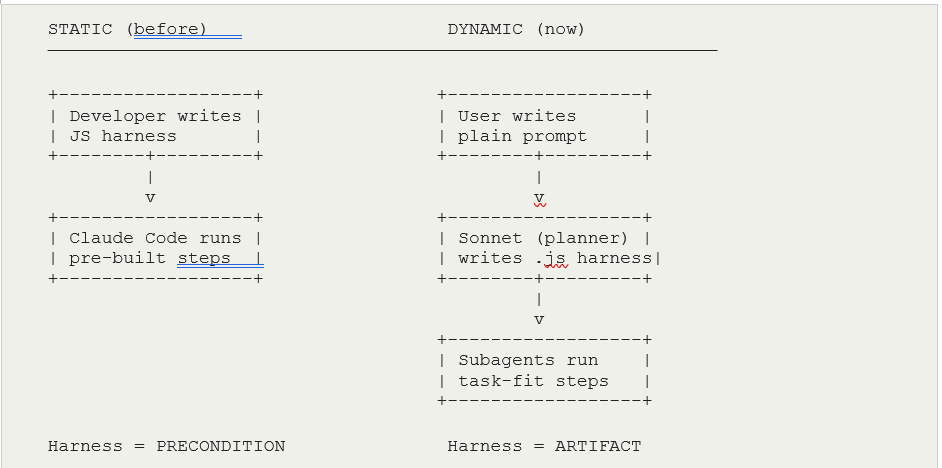
Dynamic workflows are fascinating. Recently released, they give Claude Code the ability to write its own JavaScript orchestration harness at runtime. Previously, every multi-agent workflow required a pre-written coordination layer — either hand-coded or scaffolded via the Claude Agent SDK. The harness was fixed before execution began.
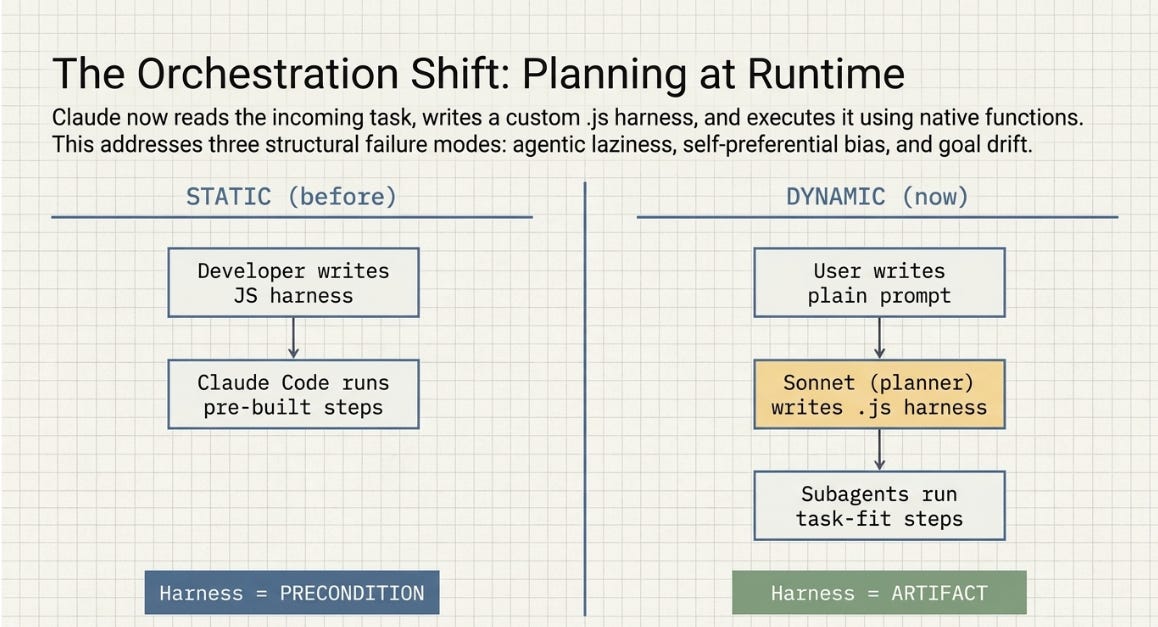
What changed is where planning lives. Claude now reads the incoming task, writes a custom .js harness, and executes it using native functions for spawning subagents, assigning models, and managing worktrees. The harness becomes an output of the task, not a precondition for it.
Three failure modes motivate this design. Agentic laziness: Claude stops early and declares a complex task done. Self-preferential bias: Claude tends to confirm its own outputs when asked to verify them. Goal drift: across many turns and compaction steps, original constraints get lost.
Separate subagents with isolated context windows address all three structurally.
2. My Prior Projects: Pattern Classification
Anthropic defines six composition patterns. My prior Claude Code experiments already implemented versions of all six — statically. The table maps each project to its primary and secondary pattern, and the metric that measured success.
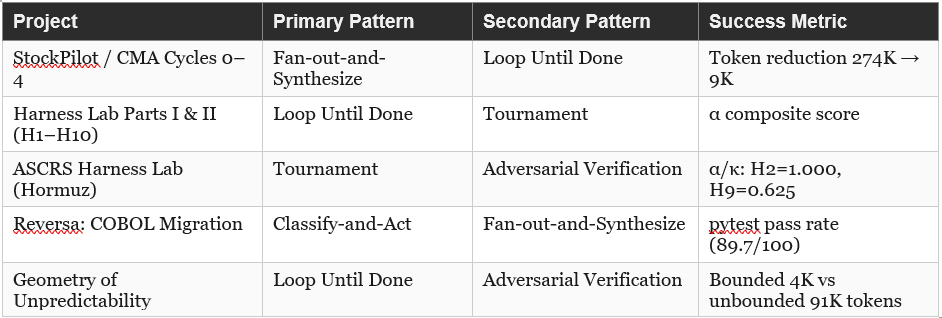
Three patterns emerge from the mapping. Tournament has been the primary evaluation pattern (H1–H10, ASCRS) but always run manually by the developer (me); dynamic workflows invert that: Claude runs the bracket. Loop Until Done appears in three of the five projects — it is the most consistently used pattern, and also the one most transparently improvable by automation (the stopping condition was always decided by you, not encoded). Generate-and-Filter has been the most implicit pattern — present in every one of my initial article draft cycles but never instrumented as a Claude Code workflow.
3. So What Are The Six Patterns?
Each pattern below includes a box-and-line diagram and a note on how my prior work maps to it.
3.1 Fan-out-and-Synthesize
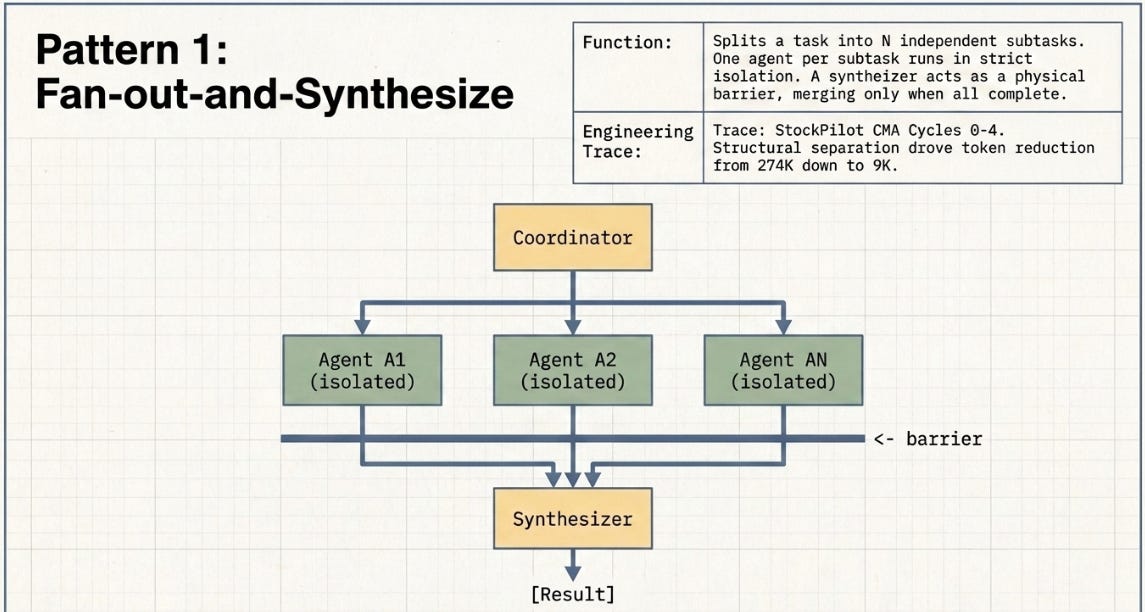
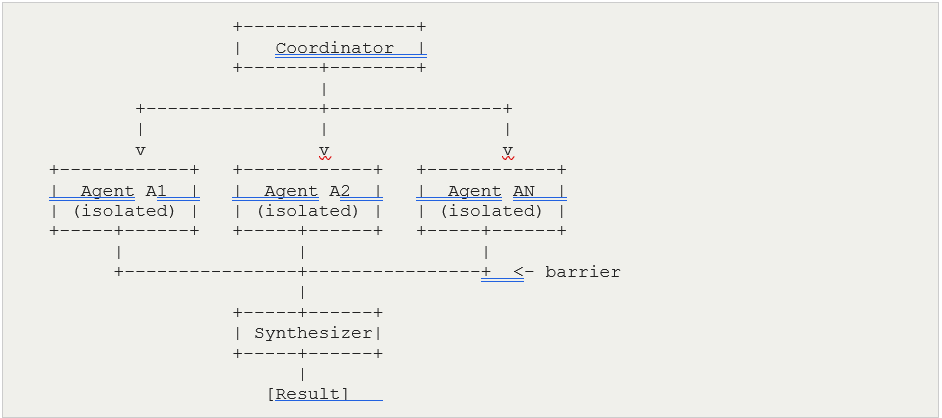
Split a task into N independent subtasks. Run one agent per subtask in isolation. A synthesizer merges outputs — it acts as a barrier, waiting for all agents before proceeding.
Prior work: StockPilot’s final CMA architecture introduced sub-agent delegation — specific tasks handed off to targeted sub-agents rather than processed by a monolithic agent. That delegation is the fan-out element. However the 97% token reduction came primarily from structural layer separation: Policy, State, SOPs, and Action had been collapsed into one context re-read on every agent turn. Cycle 2 (replacing data-dump bash tools) was the single largest driver. The mechanism was selective loading, not domain isolation.
3.2 Loop Until Done
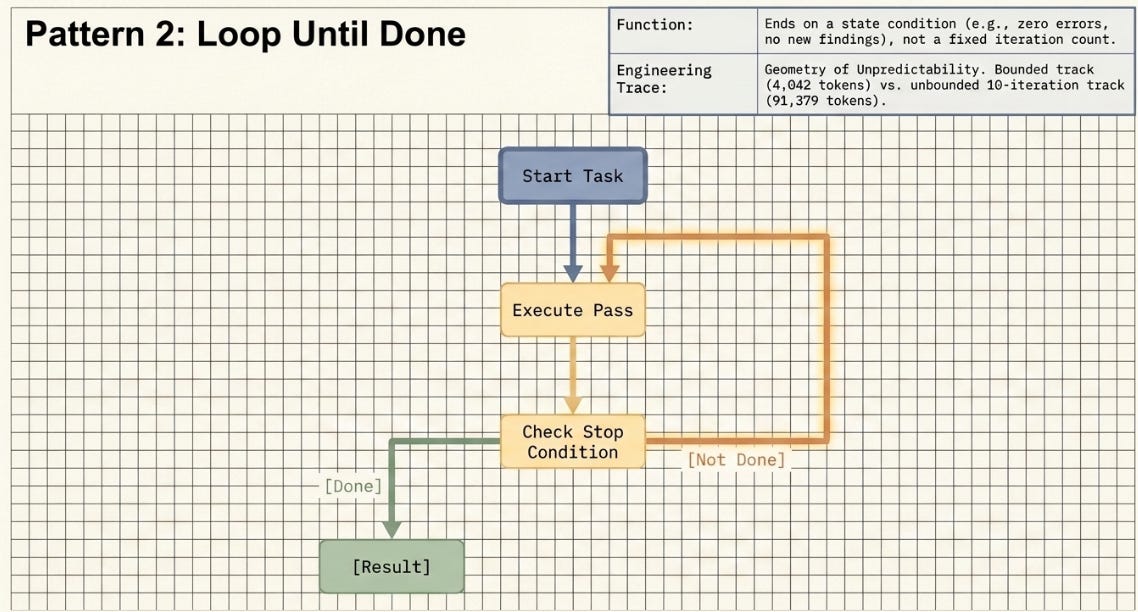
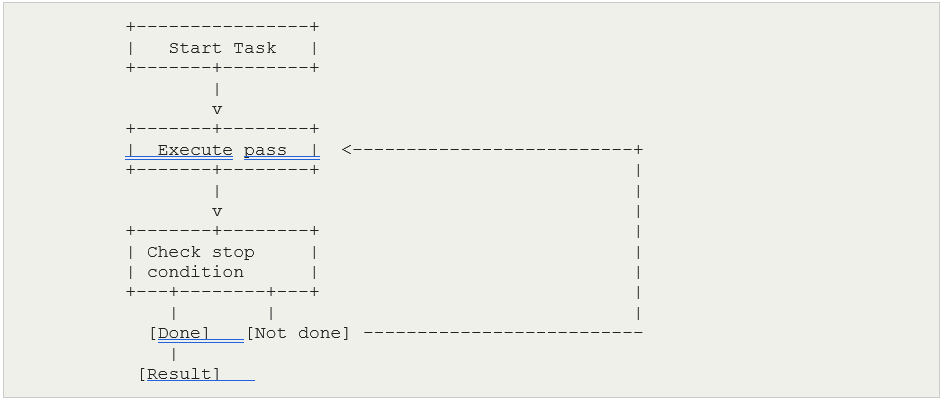
An agent executes a pass, checks a stop condition, and re-spawns if not met. The loop ends on a state condition — no new findings, zero errors, convergence threshold reached — not a fixed iteration count.
Prior work: The H1–H10 experiment series was a human-managed loop — I reviewed the results, upgraded the harness, re-ran. A Loop Until Done workflow makes the stopping logic autonomous. The Geometry of Unpredictability experiment directly tested this pattern: a bounded track with a circuit breaker at iteration 3 (4,042 tokens total) against an unbounded track that ran to 10 iterations (91,379 tokens). The circuit breaker was an external stopping condition; Loop Until Done encodes that condition inside the workflow itself.
3.3 Tournament
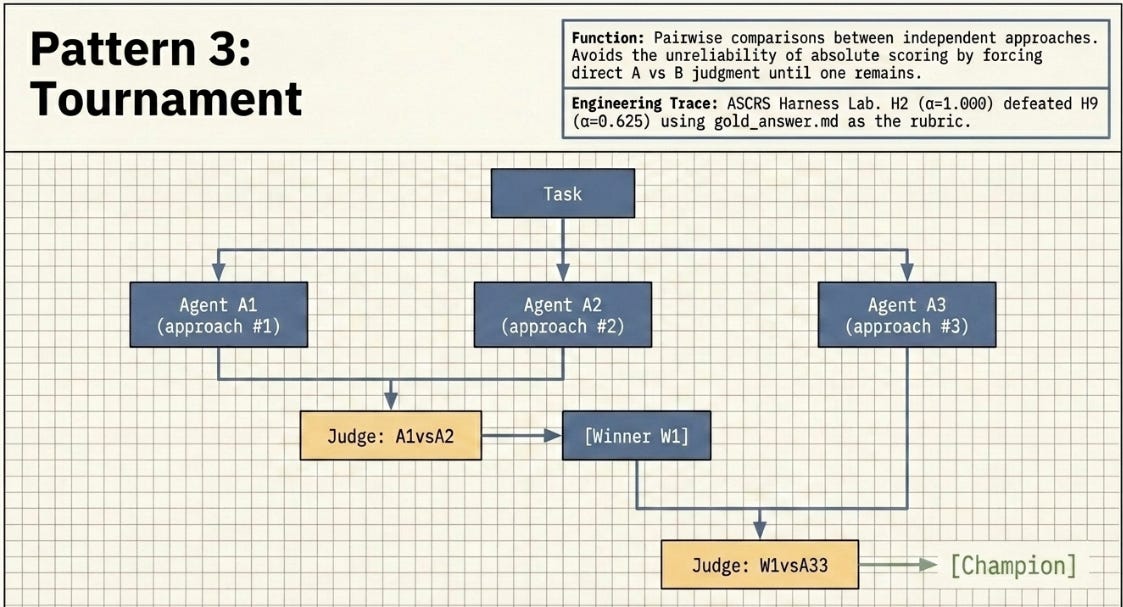
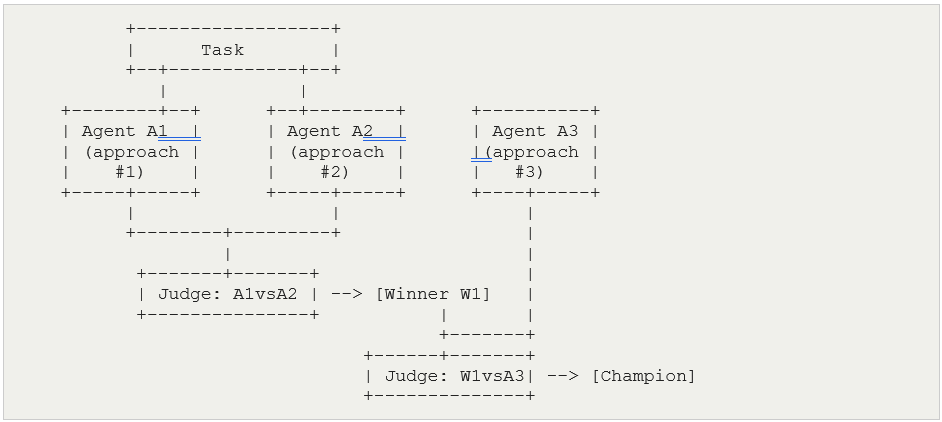
N agents each attempt the same task independently, with no shared context. A judge agent runs pairwise comparisons — A vs B, winner vs C — until one remains. Comparative judgment is more reliable than absolute scoring because it avoids the self-preferential bias problem.
Prior work: The ASCRS experiment was a manual tournament: H1–H10 as independent architectures, gold_answer.md as the rubric, α as the pairwise metric. H2 (α=1.000) defeated H9 (α=0.625). In a dynamic workflow, this bracket runs autonomously — no developer coordinates rounds.
3.4 Adversarial Verification
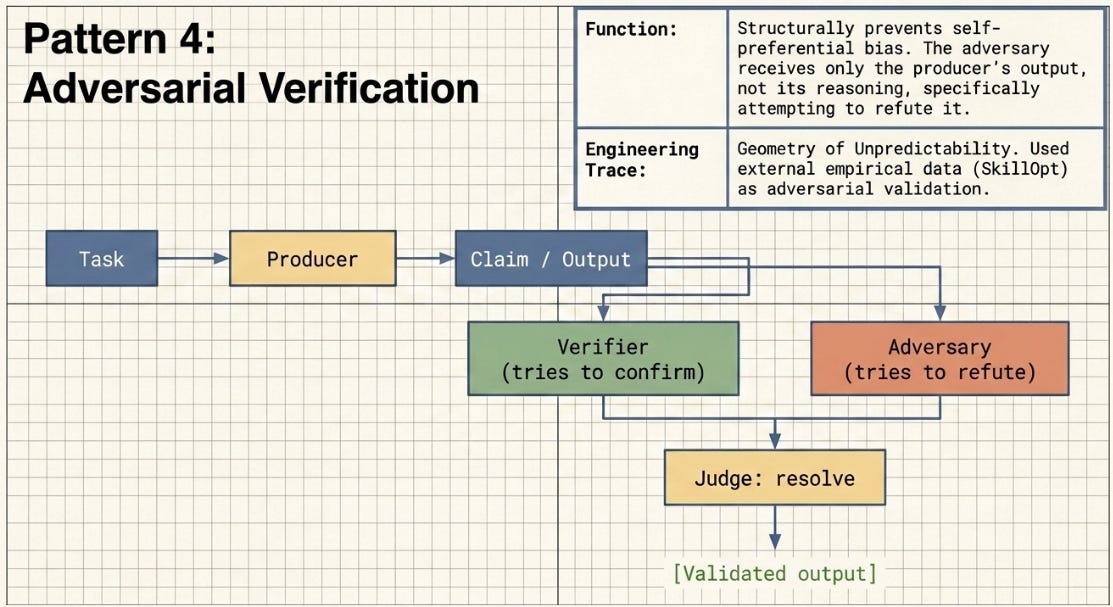
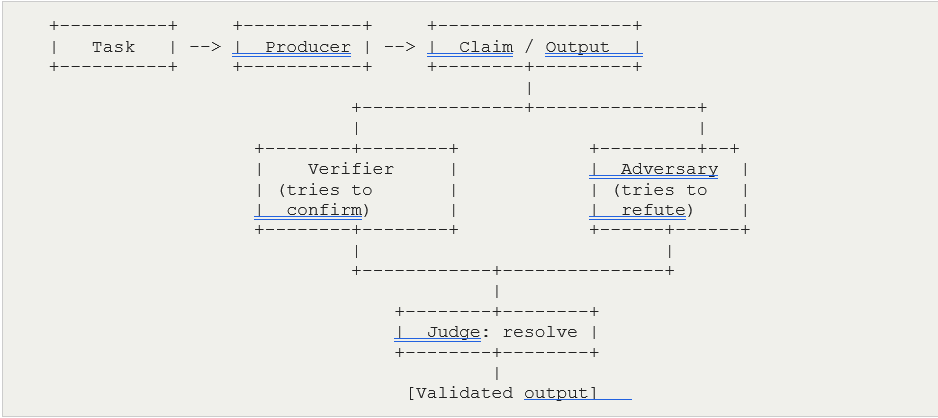
A producer agent generates output. A separate adversarial agent — with no access to the producer’s reasoning, only its output — specifically attempts to refute it. A judge resolves disputes. This structurally prevents self-preferential bias.
Prior work (secondary): The Geometry of Unpredictability used SkillOpt as external adversarial validation — real empirical data that could confirm or challenge the failure taxonomy across four article sections. That integration was adversarial verification done editorially rather than as an instrumented agent pattern, which is why it sits as the secondary pattern for that project rather than the primary.
3.5 Generate-and-Filter
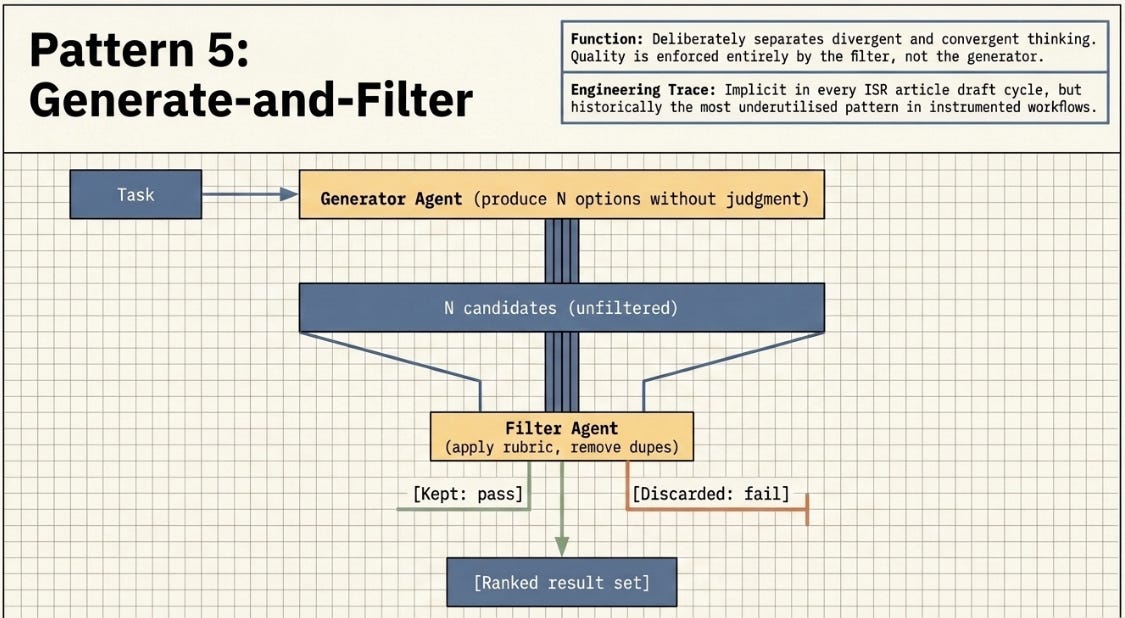
A generator agent produces a wide set of candidates. A filter agent applies a rubric, removes low-quality or duplicate entries, and returns only those meeting threshold. Quality is enforced by the filter, not the generator — this deliberately separates divergent and convergent thinking.
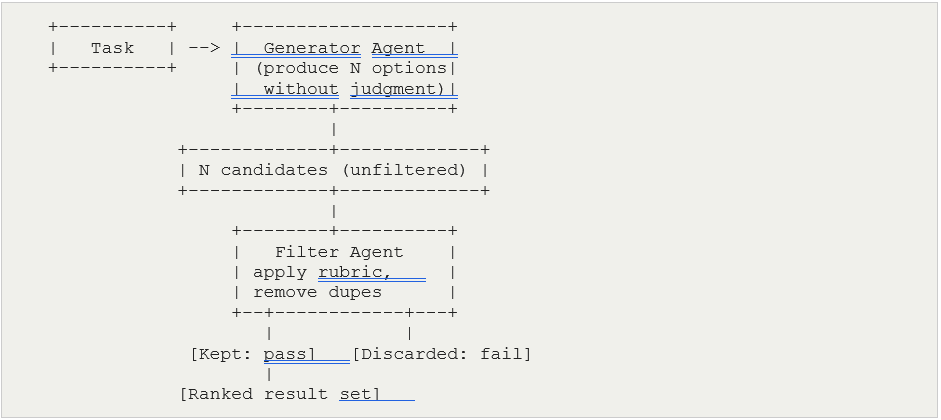
Prior work: If I think about it, every article draft involved implicit generation-and-filter — writing multiple section framings, filtering by my editorial criteria (relevant to case). It was never instrumented as a Claude Code workflow. This is the most underutilised pattern in the prior project set.
3.6 Classify-and-Act
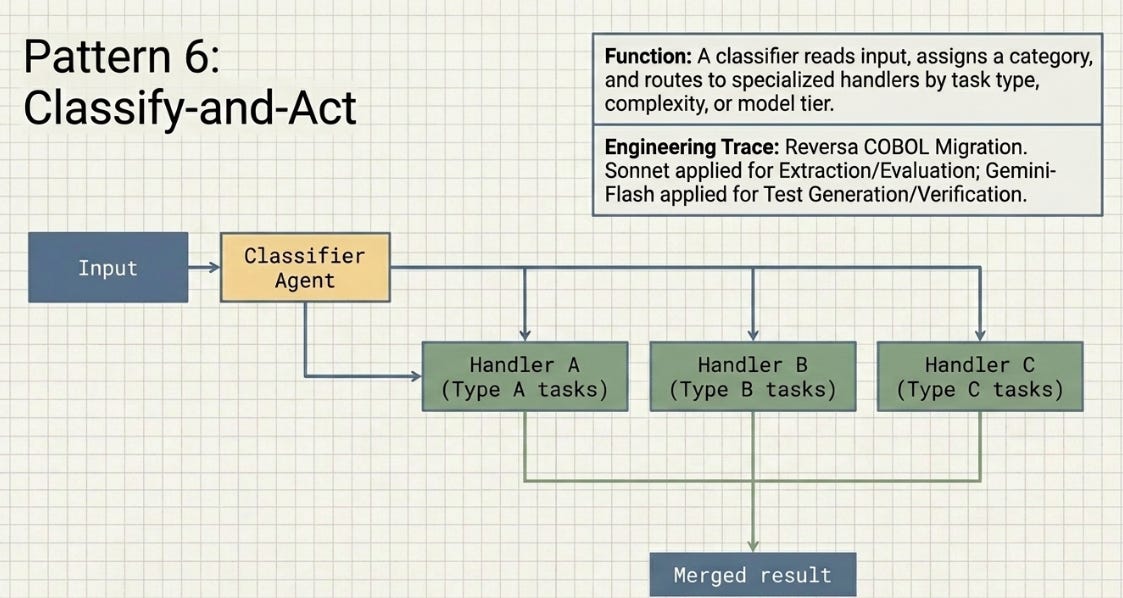
A classifier agent reads the input, assigns a category, and routes to the appropriate handler. Routing can be by task type, complexity, or model tier. Output classification also works: produce first, then classify for downstream routing.
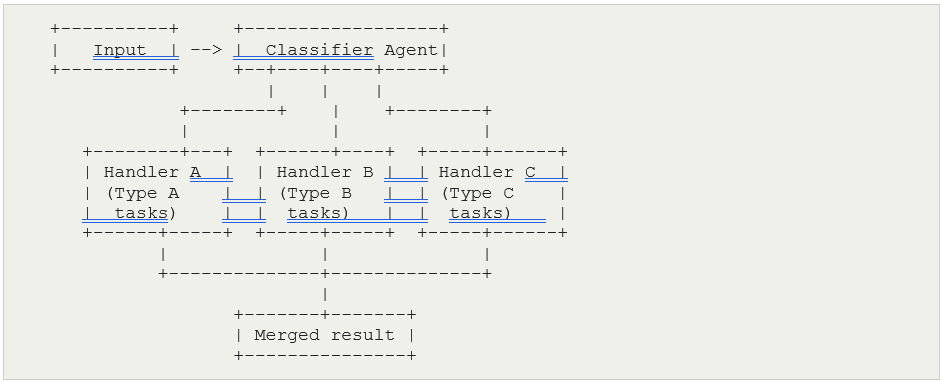
Prior work (primary): Reversa used explicit model routing by task complexity: stronger models (claude-sonnet-4-5) for Extraction and Evaluation, faster models (gemini-2.5-flash) for Test Generation and Verification. Each agent was assigned based on the reasoning demands of its step — not by implicit construct detection but by deliberate model selection. This is Classify-and-Act applied at the model-tier level. The sequential pipeline structure (Extractor → Translator → Test Generator → Verifier → Evaluator) is the secondary fan-out element — each stage handing off to a specialist rather than running in parallel.
4. Trying This Out On A Simple Domain: The Compliance Audit Pipeline
4.1 What It Is
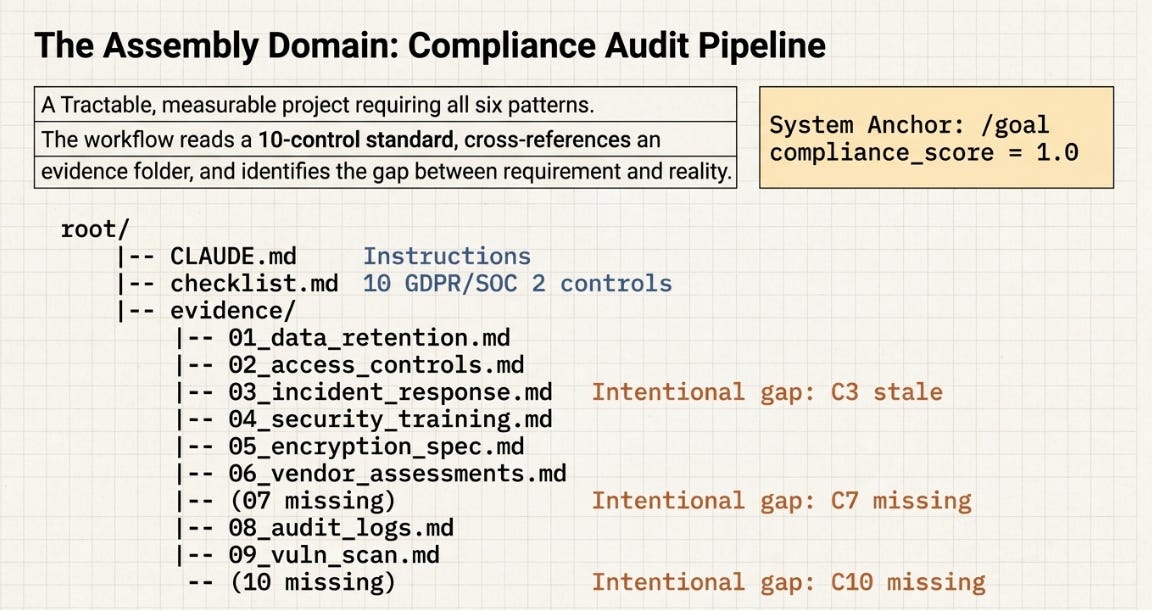
It’s possible to synthesize all patterns. The Compliance Audit pipeline is a practical, tractable project that exercises all six patterns naturally and maps directly to a real business need. The core problem: given a compliance checklist (10 controls drawn from GDPR, SOC 2, and internal policy) and a folder of evidence documents, identify which controls lack adequate evidence, generate remediation actions, and loop until all controls are satisfied.
The gap between what a compliance standard requires and what evidence actually exists is measurable, has a natural zero-state (all controls evidenced), and drifts over time as policies expire and audits lapse. It is the same structural problem as the Ritonavir analogy: the standard says Form II, the evidence keeps showing Form I.
The project starts small: a checklist.md with 10 controls and an evidence/ folder where three controls are intentionally unsatisfied — one stale document, two missing files. The compliance score (controls_passed / total_controls) replaces the α metric. Scale is added in later experiments by expanding the control set or adding multiple product lines.
4.2 How All Six Patterns Compose into a Pipeline
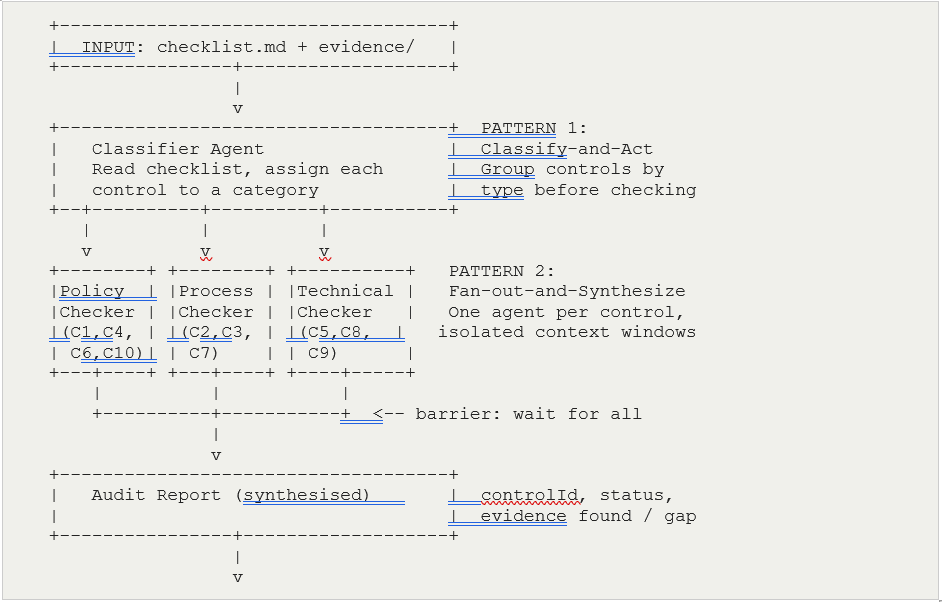
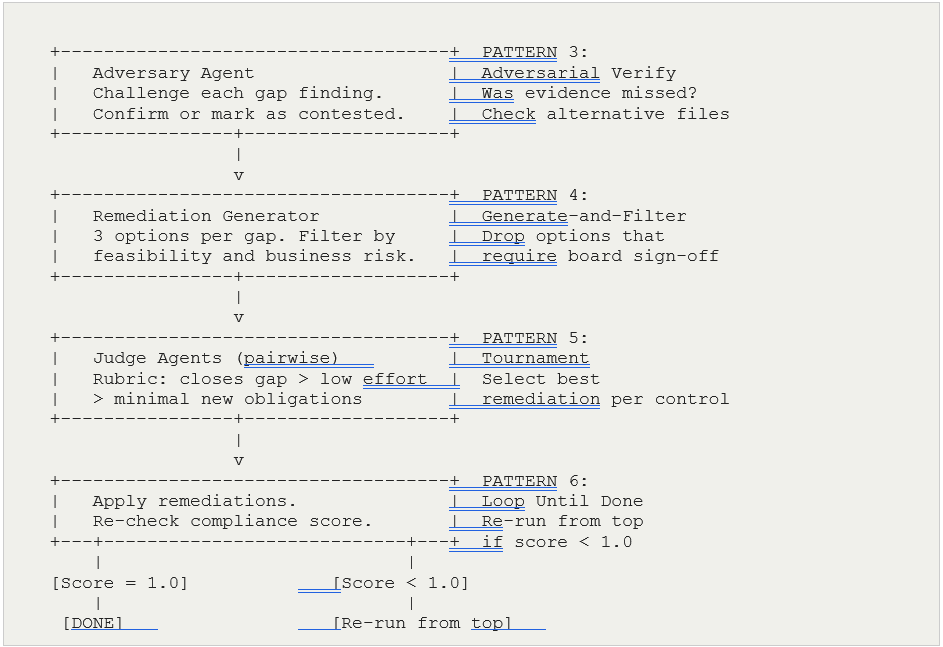
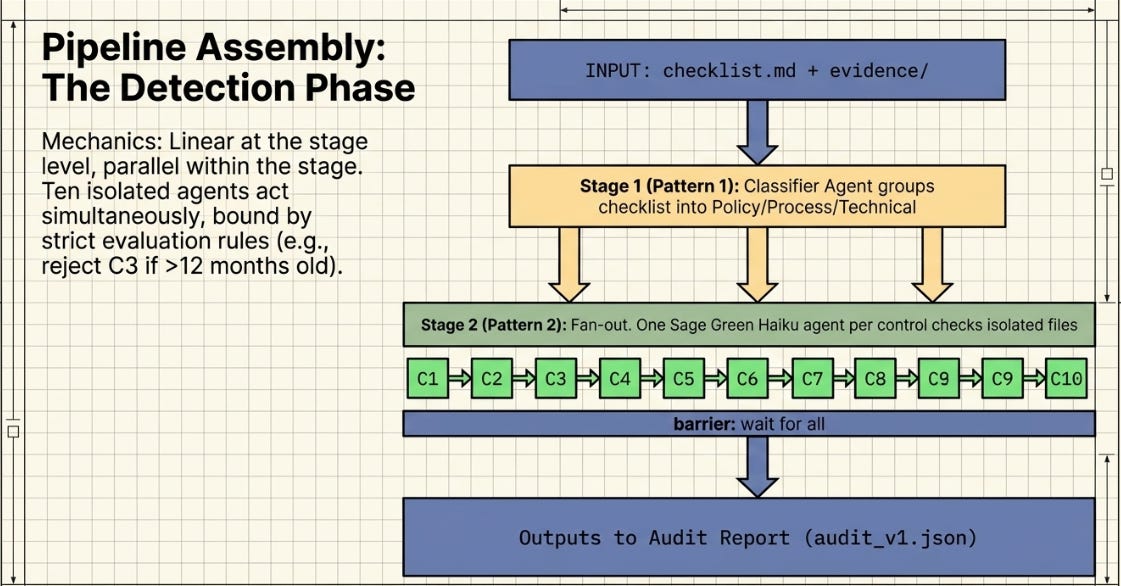
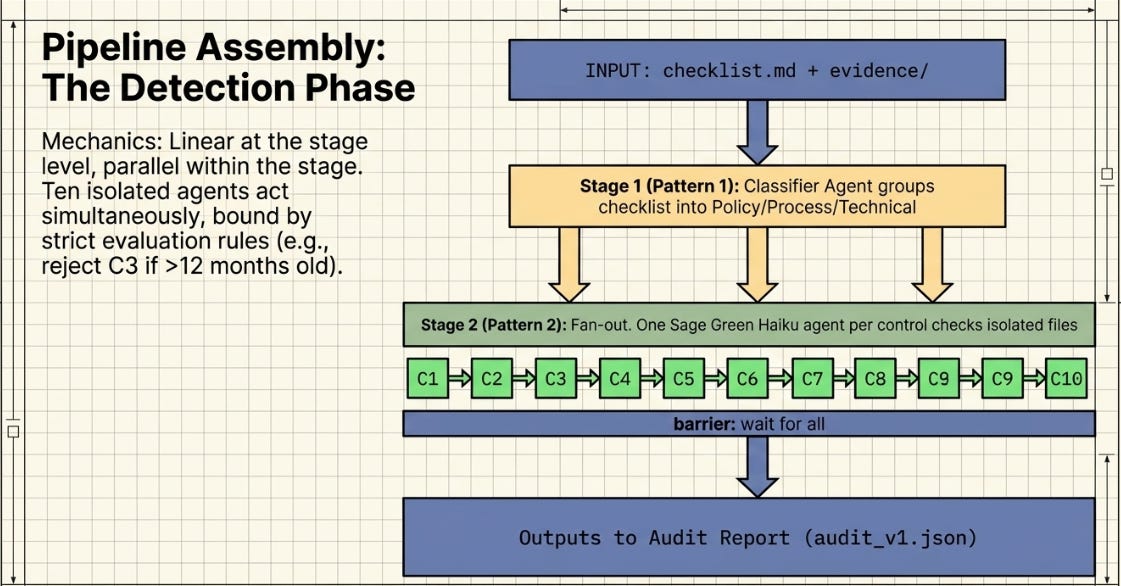
The pipeline is intentionally linear at the stage level — each pattern feeds the next. Within stages 1 and 2 there is parallelism (fan-out across controls). Stages 3, 4, and 5 are sequential quality gates. Stage 6 is the control loop. This structure is easy to reason about and straightforward to instrument in Claude Code.
5. Understanding the Project Structure
5.0 What Each File Actually Does
Before looking at the folder layout, it helps to understand the role of each component. This is where readers unfamiliar with Claude Code often get confused — the files serve very different purposes and the names do not make that obvious.
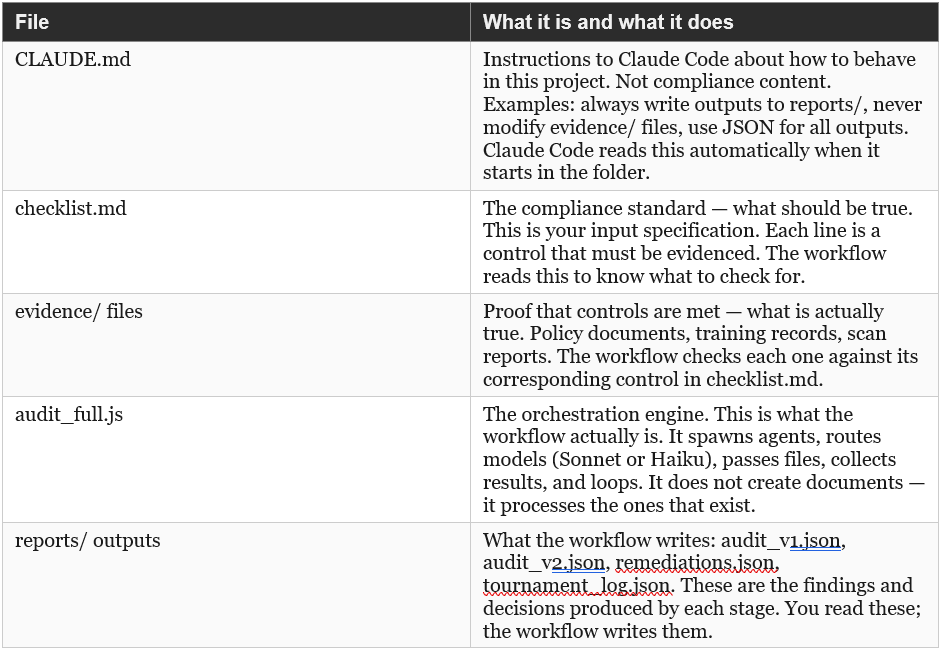
A common point of confusion: CLAUDE.md is not a compliance document. It is a project instruction file for the AI. A real business would already have policies and checklists in SharePoint or a GRC tool — CLAUDE.md is the one additional file they would write specifically for Claude Code, telling it how to handle their project.
5.1 The Difference from Prior Projects
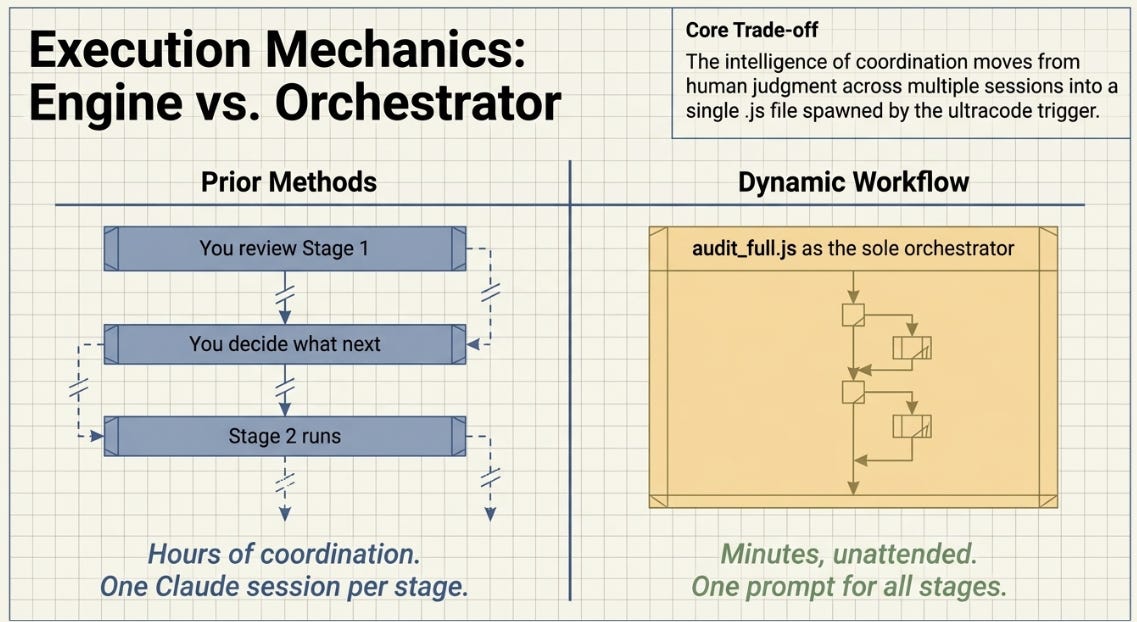
In the ASCRS Harness Lab and the Harness Engineering experiments, I was the orchestrator. I reviewed the output of H1, decided to run H2, reviewed that result across a Claude.ai session, upgraded the harness, ran the next stage. The coordination intelligence lived in my judgment and in any prior Claude.ai conversation history.
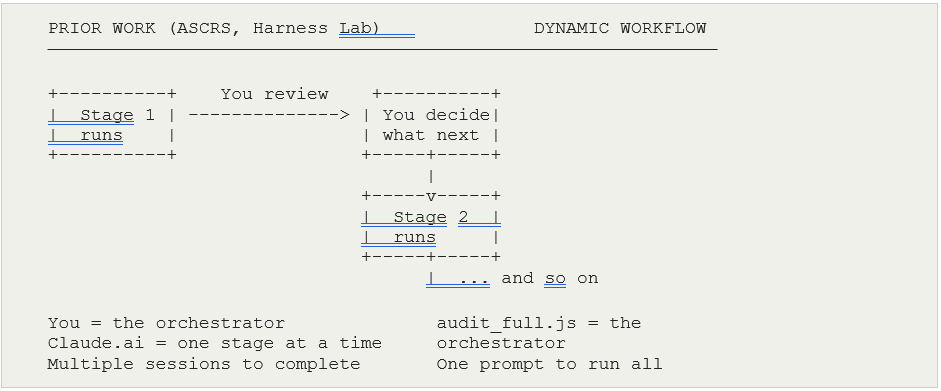
Dynamic workflows move that coordination into the .js file. Claude Code runs all stages — fan-out, adversarial check, tournament, loop — autonomously, without you intervening between them. The session you managed manually across multiple Claude.ai windows is now a single Claude Code run from one prompt.
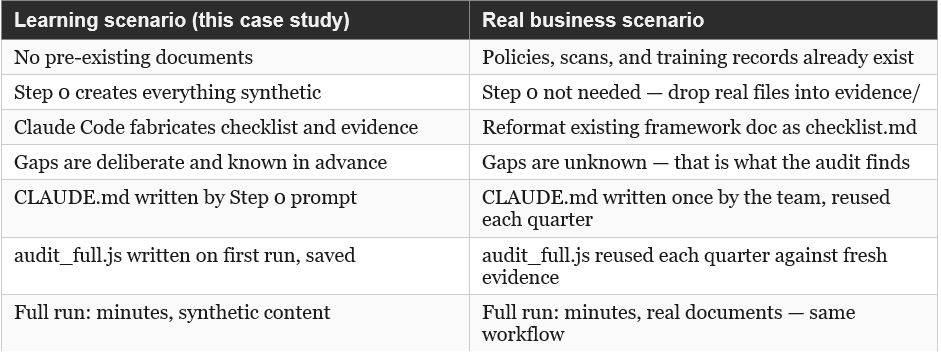
5.2 Learning Scenario vs Real Business
The prompts in Section 7 cover both situations. The distinction is only in Step 0.
5.3 Folder Structure
Create a dedicated subfolder. Claude Code reads CLAUDE.md at the project level and saves workflows relative to the active workspace. Opening in the parent folder risks picking up a different CLAUDE.md or none at all.
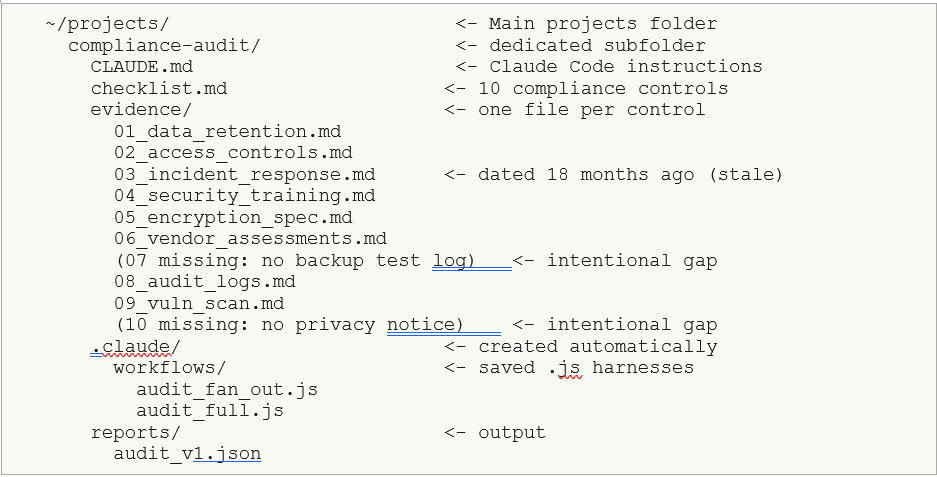
Open in the compliance-audit/ folder directly (not the parent). Claude Code reads the nearest CLAUDE.md it finds walking up from the workspace root. If you open in the parent folder, it may pick up a different CLAUDE.md or none at all.
5.4 Saving and Reusing Workflows
When a dynamic workflow finishes, press S in the workflow menu to save it to .claude/workflows/. Saved workflows can be called by name in future prompts. They are plain JavaScript files you can inspect, edit, and version-control. Each saved workflow becomes a named stage in your experiment log — equivalent to the H1–H10 harness notation from prior work.
6. Model Routing: Sonnet Plans, Haiku Executes
6.1 How Model Switching Actually Works
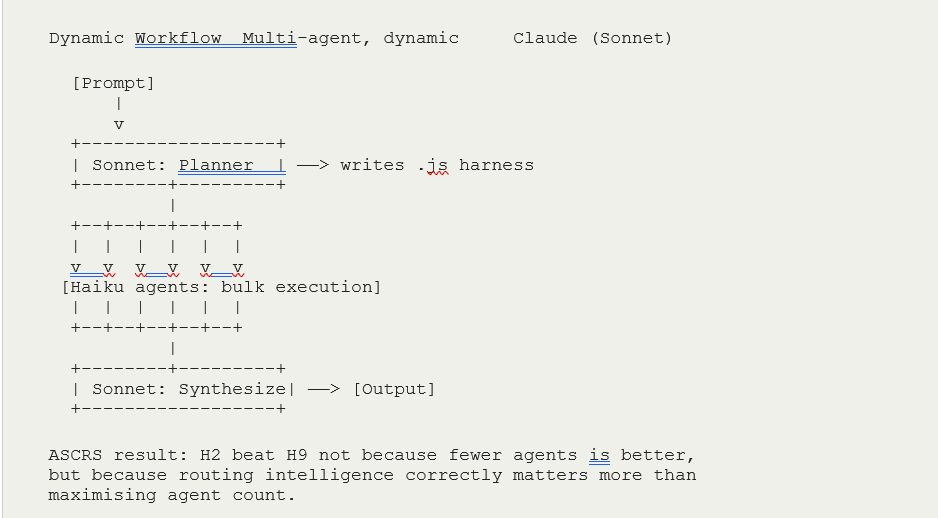
There is no UI toggle for switching models mid-workflow. The switching is in the workflow .js file itself. When Sonnet writes the harness, it can specify which model each subagent uses. Subagents that require heavy reasoning get Sonnet; subagents doing bulk, well-specified checks get Haiku. The orchestrator assigns models; you do not.
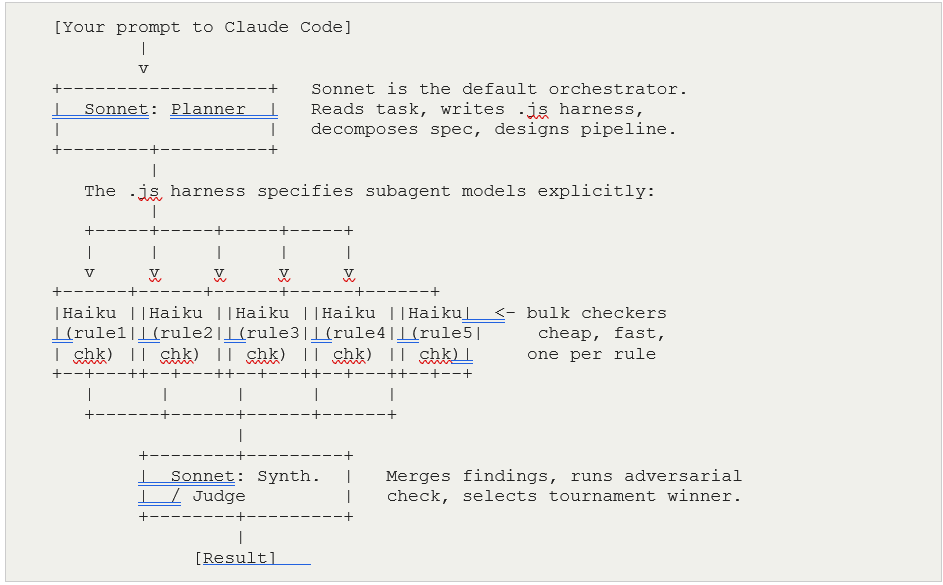
In practice, you do not write this routing logic. You prompt Sonnet to write a workflow where bulk checks use Haiku and synthesis and judgment use Sonnet. Sonnet generates the .js file with the model assignments already in place. The routing instruction goes into your initial prompt, not into code you write.
6.2 When to Route to Each Model
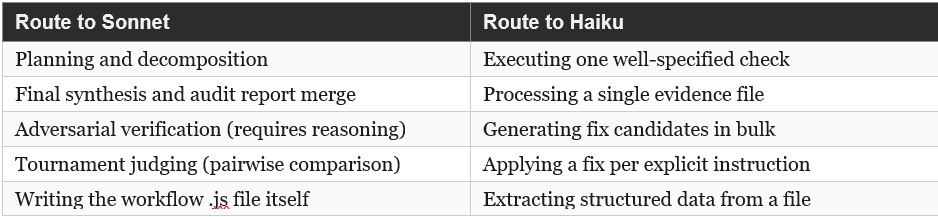
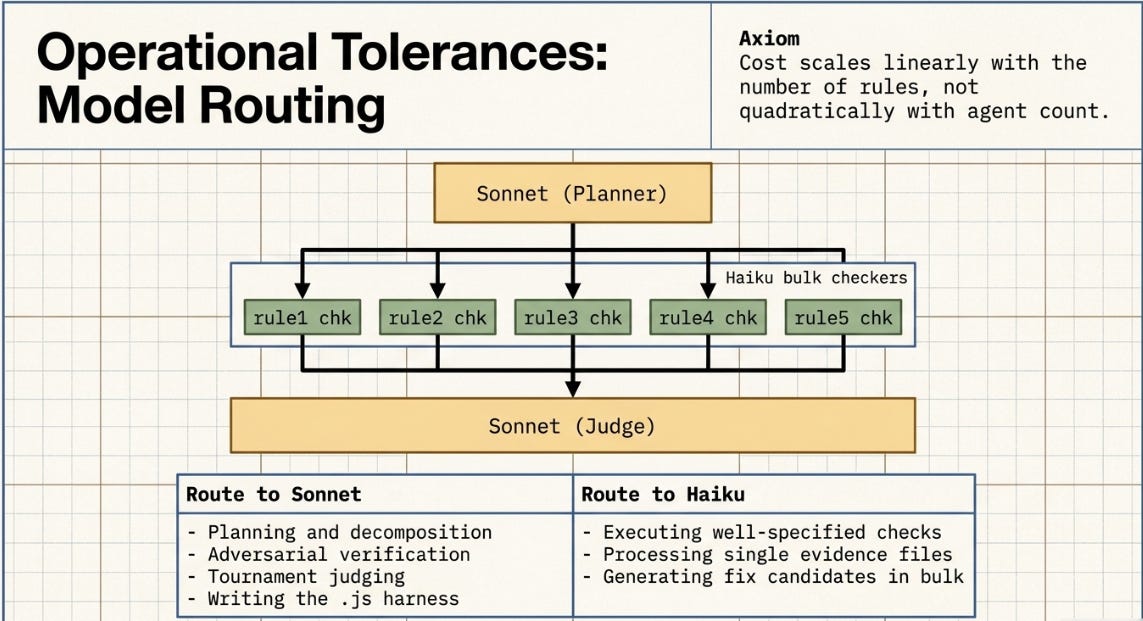
The ASCRS result (H2 defeating H9) was not a refutation of multi-agent design. It measured a greenfield document task where planning overhead dominated execution benefit. Routing addresses this: Sonnet is applied only where reasoning matters, Haiku handles volume. The cost scales linearly with the number of rules, not quadratically with agent count.
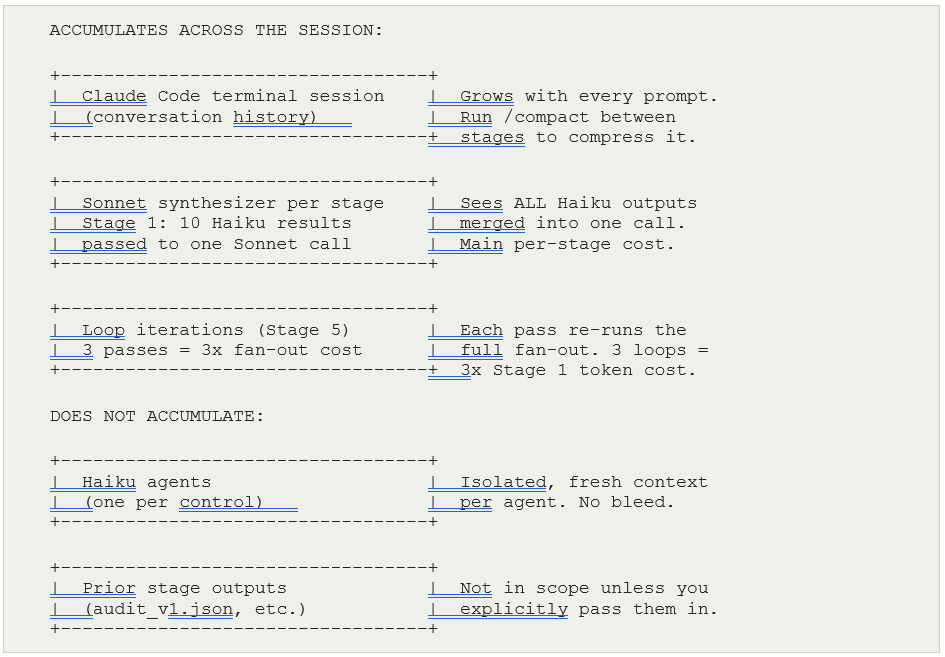
6.3 Where Tokens Actually Accumulate
The per-stage budget estimate is only part of the picture. The more important question is what accumulates across multiple ultracode calls in a session. The answer is not the Haiku agents — those are isolated and fresh each time. The risk is in three other places.
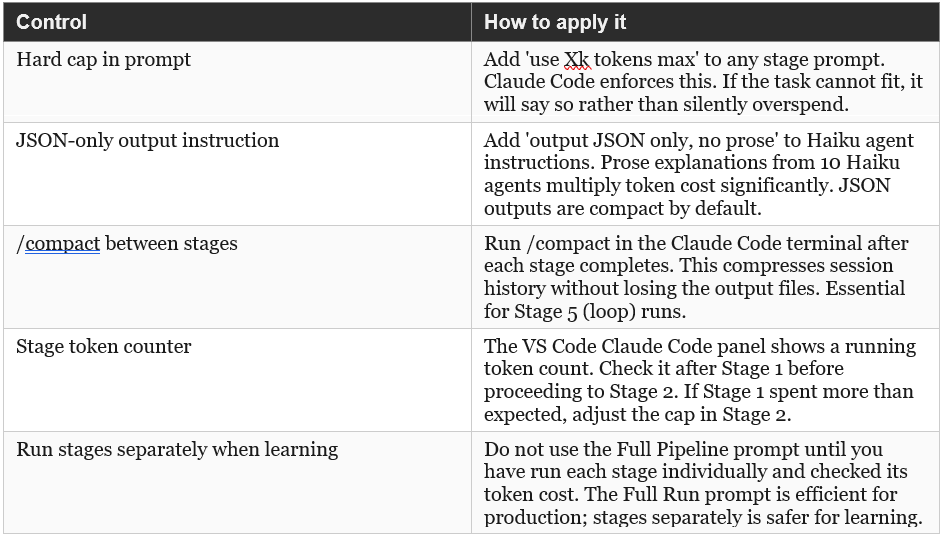
6.4 Token Controls
Five controls are available. The first three are in my prompts directly — the most reliable form of control because Claude Code treats token caps as hard limits, not suggestions.
6.5 Token Caps Embedded in Each Stage Prompt
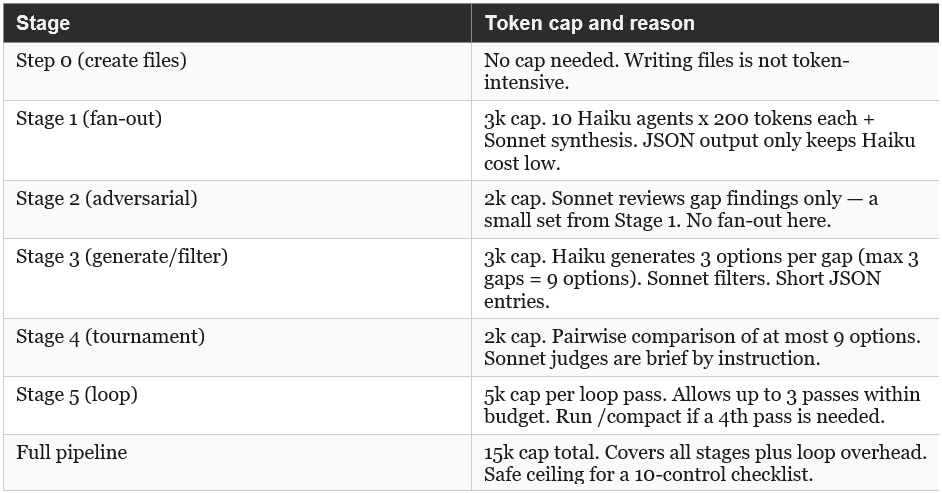
The prompts in Section 7 include token caps and output format controls directly. The table below shows the cap per stage and the rationale.
7. Prompts for Claude Code
7.1 What ‘ultracode’ Means
ultracode is a trigger word, not a separate mode. Anthropic built it into Claude Code as a shorthand signal meaning: write a dynamic workflow JavaScript harness for this task, rather than responding inline or writing a simple script. Without it, Claude Code may answer directly or write straightforward code. With it, Claude Code commits to building a multi-agent orchestration file.
You can also just ask Claude to ‘use a workflow’ or ‘create a workflow’ explicitly — ultracode is simply the most compact form. It is useful in short prompts where you want the harness behaviour without a long preamble.
7.2 The /goal Command
/goal sets a persistent objective anchor at the session level. You set it once at the start and Claude Code holds it in view across all subsequent prompts, flagging if any action would move away from it. It does not re-run anything automatically — it is orientation, not execution.
Loop Until Done is an active control loop inside a workflow. It re-spawns agents, checks a stop condition, and continues until that condition is met — autonomously, without you prompting again. The two are complementary, not alternatives.
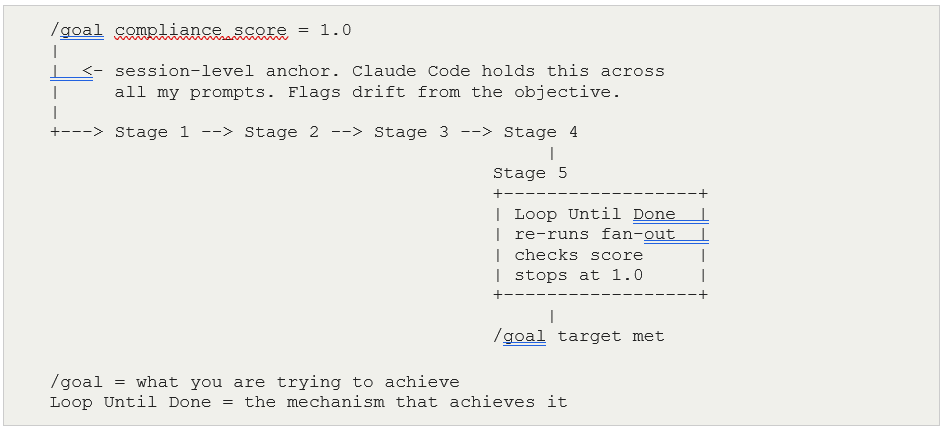
For this case study: type ‘/goal compliance_score = 1.0’ before running Stage 1. Each stage then runs with that objective visible. The Loop Until Done in Stage 5 is what drives toward it. If you skip a stage or run them out of order, Claude Code will note that the /goal is not yet satisfied.
7.3 Prompts, in Order
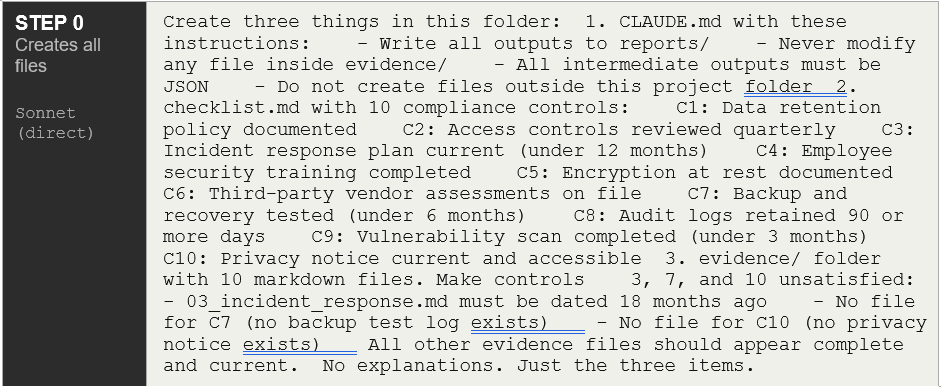
If you have no pre-existing files — which is the case for this case study — start at Step 0. That single prompt creates the entire project environment: CLAUDE.md, checklist.md, all ten evidence files, and the three intentional gaps. After Step 0 finishes, the folder is fully populated and Stages 1–5 can run against it. You do not write any files yourself.
If you are running against real documents, skip Step 0 and go directly to Stage 1. The workflow prompts are identical either way — only the content of the files differs.
Step 0: Create the Entire Project Environment
Step 1: Fan-out-and-Synthesize
Step 2: Adversarial Verification
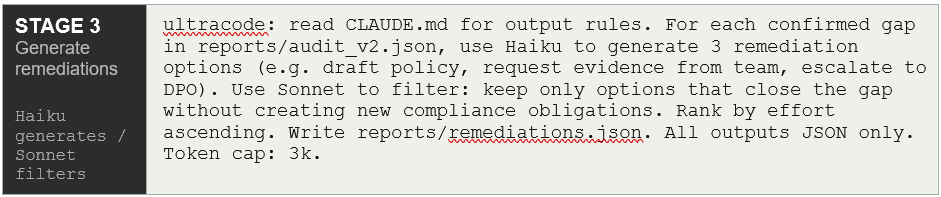
Step 3: Generate-and-Filter
Step 4: Tournament

Step 5: Loop Until Done

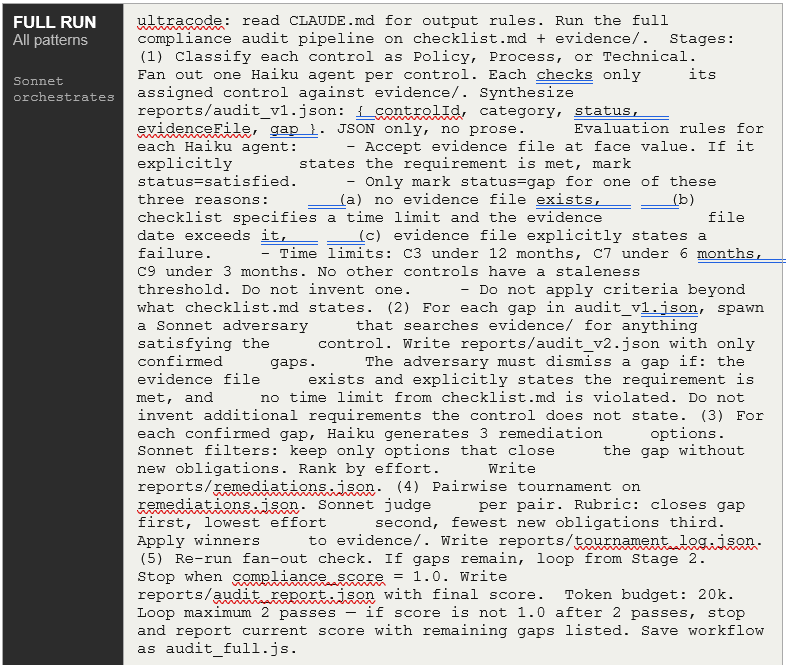
Full Pipeline (Single Prompt)
FULL RUN
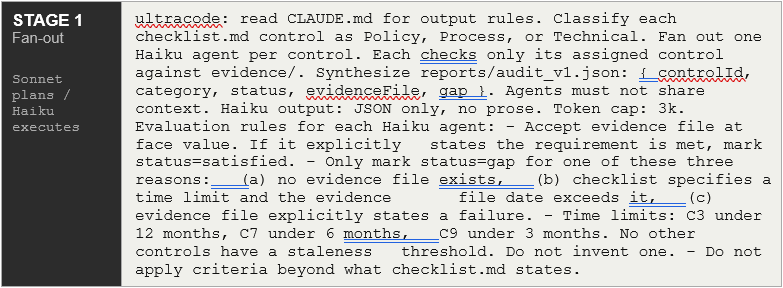
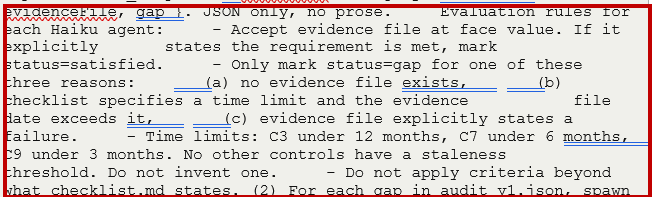
Note that the evaluation criteria was very important, without which Haiku “interpreted” what failure meant:

Run stages 1–5 individually when:
You are doing this for the first time
You want to inspect the output of each stage before proceeding
You want to check the token count after each stage
Something fails and you need to know which stage broke
Run the Full Pipeline prompt when:
You have already run the stages individually at least once and know they work
You want to run the whole audit in one go (production use)
You are re-running against updated evidence files on a recurring basis
The practical learning path is: run Step 0, then run stages individually the first time through. After that, save the workflow with S and use the Full Pipeline prompt for every subsequent run. That is what “save workflow as audit_full.js” at the end of the Full Run prompt means — the first full run generates and saves the reusable harness.
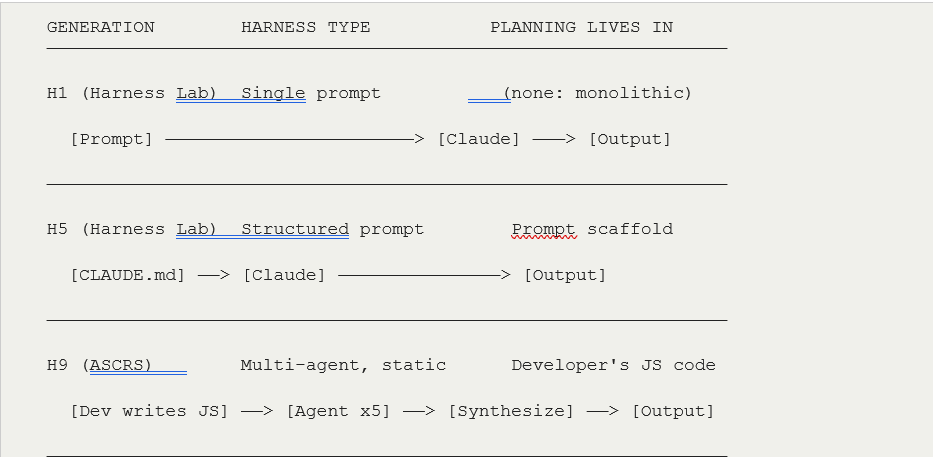
8. Architectural Evolution: H1 to Dynamic Workflow
The diagram below places dynamic workflows in the progression from my earliest harness experiments. It is a single continuous trajectory, not a replacement.
9. Prior Approaches vs Workflow Patterns
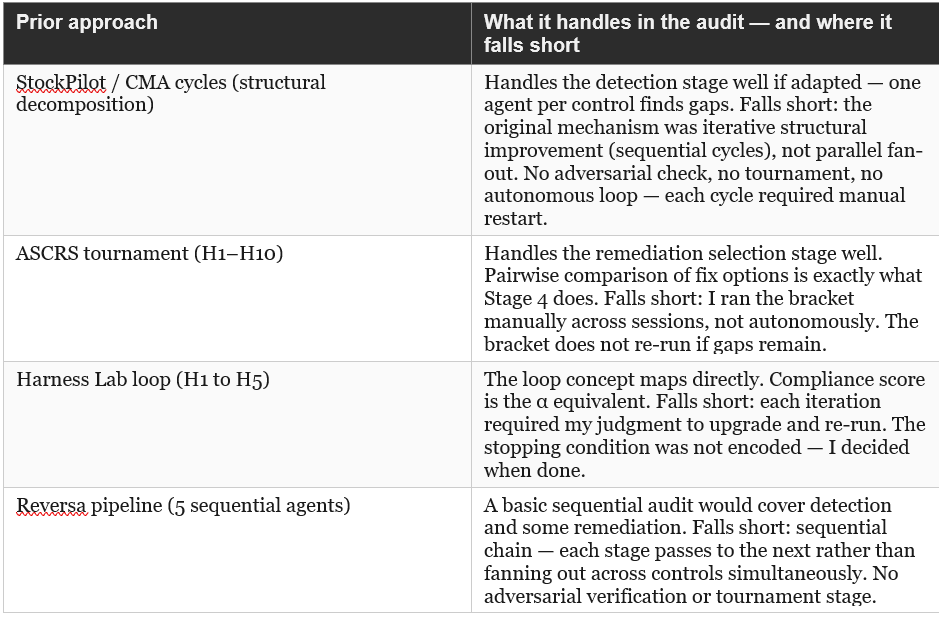
An honest question for any project where you already have working methods and times when I have had to rethink: would the prior approaches have handled the compliance audit as well as, or better than, a dynamic workflow? The answer depends on the scale and who is coordinating.
Prompting skill does not disappear with workflows — it moves upstream.
With a single-agent prompt, bad instructions produce a bad response and you see it immediately. With a workflow, bad instructions get multiplied across ten Haiku agents running in parallel, fed into a Sonnet synthesizer, passed to an adversary, and looped. The error compounds before you ever see output. The prompt matters more, not less.
The workflow is only as good as its evaluation criteria.
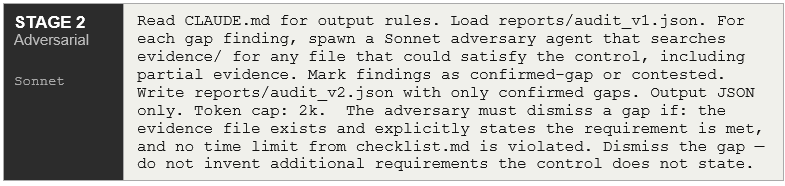
Initially i had some issues not being specific with evaluation criteria for Haiku (which it then “reinterpreted”). What Claude Code flagged was not a structural problem — the pipeline logic was correct. It was a specification problem: the agents (Haiku) had no precise definition of what constitutes a gap. Without that, every agent applies its own judgment independently and inconsistently. The guard rails I added (three gap conditions, explicit time limits, adversary dismissal rule) are not workflow logic — they are a rubric. The same thing when I hand-crafted for the ASCRS gold answer and the α metric. The mechanism is different but the discipline is the same.
Automation changes when you catch errors, not whether you catch them.
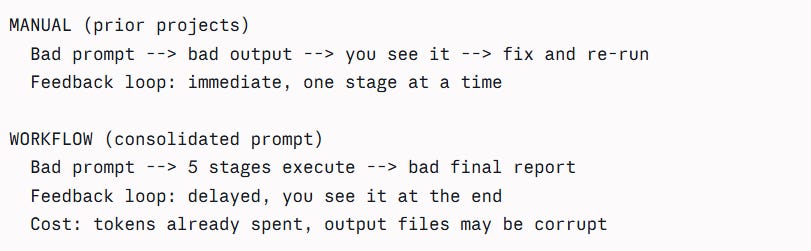
This is why running stages individually the first time is genuinely important — not just for token management but because it surfaces specification gaps at Stage 1 before they propagate to Stage 5. Once you have confirmed the evaluation criteria work correctly at Stage 1, the consolidated prompt is safe to use repeatedly.
The broader point and this is so critical: dynamic workflows are a force multiplier on whatever the prompt says. Precise prompting produces precise automation. Vague prompting produces vague automation at scale, which is harder to diagnose than vague output from a single agent. The skill shifts from crafting one good response to crafting one good specification — which is a higher-order version of the same discipline.
9.1 How Each Prior Approach Maps to the Audit
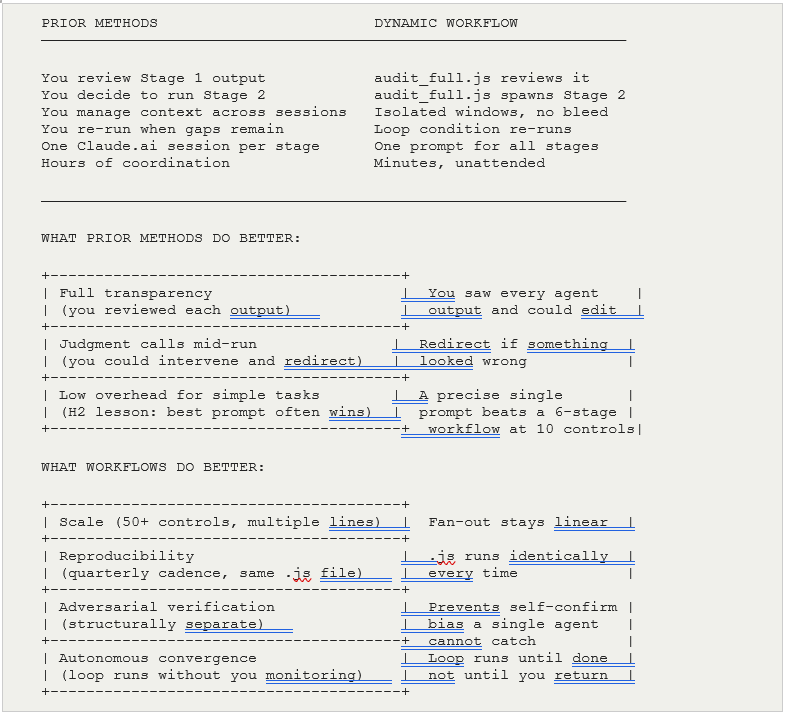
9.2 The Core Trade-off: Who Coordinates
The capability difference between prior methods and dynamic workflows is not large for a 10-control case study. The coordination difference is significant at any scale. These are questions you, the reader, consider before you apply Dynamic Workflows. I have found them useful:
9.3 Practical Recommendation
For a 10-control checklist with known gaps, a well-crafted single prompt in Claude.ai (the H2 approach) would find the gaps adequately. The workflow earns its complexity at three thresholds. Take this with a pinch of salt. Different tasks, circumstances and applications to various domains apply:
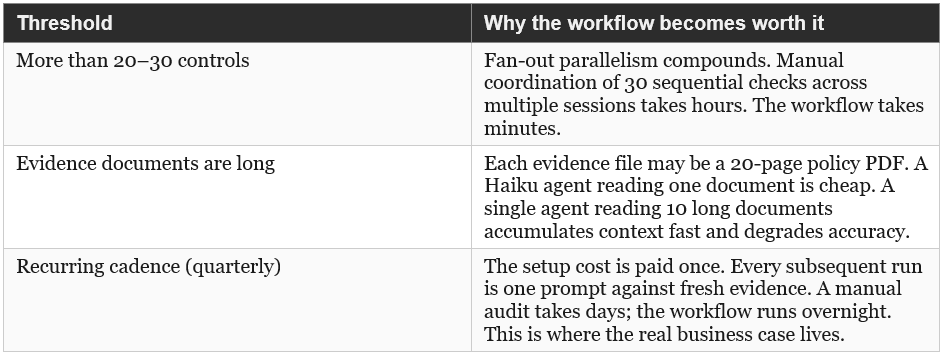
The ASCRS result (H2 defeating H9) still holds here: for a greenfield, one-time task with few inputs, a precise prompt beats a multi-agent workflow. Workflows pay for themselves when the task recurs, scales, or requires structural independence between agents to prevent bias.
Final Thoughts - Evaluation criteria must be clear!
A high level of dicipline is required when using workflows. There are four things worth building into your general practice.
1. A rubric before you run
Before writing the workflow prompt, write down explicitly:
What counts as a pass
What counts as a fail
What the edge cases are and which way they resolve
This is exactly what I built for ASCRS (gold_answer.md, deliberate traps, three-tier confidence). The same discipline applies to workflow prompts. If you cannot write the rubric in plain language before running, the agents cannot apply it consistently during the run.
ASCRS equivalent        Workflow equivalent
───────────────────────────────────────────
gold_answer.md          Evaluation rules in Stage 1
Deliberate traps        Edge cases called out explicitly
α scoring rubric        Adversary dismissal criteria
Expected H1 alpha       Token budget with loop guard
2. A pre-flight checklist for any workflow prompt
Before running, ask these five questions:
+--------------------------------------------------+
| 1. INPUTS    Are all input files named            |
|              explicitly? Does the prompt tell     |
|              agents exactly where to read from?   |
+--------------------------------------------------+
| 2. OUTPUTS   Are all output paths explicit?       |
|              reports/ not just a filename.        |
+--------------------------------------------------+
| 3. CRITERIA  Is pass/fail defined precisely?      |
|              Could two agents reading the same    |
|              file reach different conclusions?    |
+--------------------------------------------------+
| 4. EDGE CASES Are time limits, thresholds, and    |
|              special conditions stated? Or left   |
|              to agent judgment?                   |
+--------------------------------------------------+
| 5. FAILURE   What happens if a stage fails or     |
|              the loop does not converge?          |
|              Is there a fallback and a cap?       |
+--------------------------------------------------+
If any answer is “the agent will figure it out” — that is the gap to fix before running.
3. A dry run on one unit before fanning out
Before running the full fan-out across all ten controls, run one agent against one control manually and inspect the JSON output. Confirm:
The status field is populated correctly
The gap field says what you expect
The evidenceFile field points to a real file
One agent, one control, one read. If that output is wrong, fix the evaluation rules before multiplying across all ten. This costs almost nothing and catches specification errors before they compound.
  Test one unit first
        |
        v
  +------------------+
  | Agent: C3 only   |  <- inspect output manually
  +------------------+
        |
   Output correct?
        |
   Yes --> run full fan-out
   No  --> fix evaluation rules, re-test C3
4. A prompt template for future workflow projects
This is the reusable structure that forces completeness. I keep it as a file in my projects folder:
WORKFLOW PROMPT TEMPLATE
────────────────────────
ultracode: read CLAUDE.md for output rules.

INPUTS:
  [list every file the workflow reads]

PIPELINE:
  Stage 1: [what it does]
    Evaluation rules:
    - Pass condition: [explicit]
    - Fail condition: [explicit, with all edge cases]
    - Do not: [what agents must not invent]

  Stage 2: [what it does]
    Dismissal rules:
    - Dismiss if: [explicit condition]
    - Confirm if: [explicit condition]
    - Do not: [what the adversary must not invent]

  Stage 3-N: [downstream stages]

OUTPUTS:
  [list every file the workflow writes, with full path]

CONTROLS:
  Token budget: [number]k
  Loop maximum: [N] passes
  Fallback: if not converged after [N] passes, [action]

Save workflow as [name].js
The underlying principle across all four is the same one the ASCRS work established: the intelligence is in the structure, not the execution. A workflow with vague criteria delegates judgment to agents that have no shared context and no consistent standard. A workflow with precise criteria turns agents into reliable executors of a well-defined specification. The prompt is the specification. Writing it is the skilled work.
A lot of good advice is found in the Anthropic Blog on similar.
References
• Anthropic (2026). Dynamic Workflows reference documentation.
• “The Geometry of Unpredictability.” Harness Engineering Series — SkillOpt integration, MCP token economics, failure taxonomy.
• “The Structure Is the Intelligence.” StockPilot agent decomposition, CMA Cycles 0–4, 97% token reduction result.
• ASCRS Harness Lab. H1–H10 architecture evaluation, α/κ metrics, H2 vs H9 result (Hormuz Strait domain).
• “The Invisible Codebase.” Reversa five-agent COBOL-to-Python pipeline.
• Harness Engineering Parts I & II. H1–H10 progressive harness experiments, E1–E11 token efficiency series.